Versione italiana: leggila qui.
You remember your first two or three graded cards by heart. Then comes the fifth, the tenth, a PSA submission that comes back months later, a trade at a show, and the question becomes: how many slabs do I own, which grades are they and what is my graded collection worth today?
Tracking a graded card collection means always having, for every slab, the card, the grading company, the grade, the certificate number and an up-to-date value. In this guide we cover what to record, why a spreadsheet lets you down sooner or later and how to manage graded Pokémon cards on DarkDex, the free Pokémon TCG collection app that shows them inside their slab and adds them to your collection total.
In short. Tracking a slab takes six pieces of data: card (set and number), company (PSA, Beckett BGS, CGC, ACE, TAG or SGC), grade, certificate number, language and value. On DarkDex you add a graded card like any other card by turning on the "Graded" switch: for grades 7, 8, 9 and 10 DarkDex works out the value, per company and grade, in the language of your copy. Graded cards get their own tab, their own total, a filter and a sheet in the export. On the Free plan you keep one, with Pro they are unlimited.
Why track your graded cards
A graded card is a card that a specialist company has inspected (centering, corners, edges, surface), given a grade from 1 to 10 and sealed in a slab with a label and a certificate number.
It is a different item from the same raw card: it has its own market and its own price. A Charizard ex 199/165 from 151 in PSA 10 and the same card raw are worth very different amounts, and a PSA 9 is not worth a PSA 10. That is why a graded collection needs more data than a regular one:
- knowing what it is worth today, not at the price you had in mind when you bought it;
- keeping your certificates: you need them to prove a slab is genuine when you sell or trade;
- deciding what to send for grading: if you know a card's PSA 10 value against its raw value, you know whether the submission pays off;
- insurance and inventory: after theft or damage, a list with grade, certificate and value is the first thing you will be asked for.
What to record for every graded card
Notebook, spreadsheet or app, these are the fields you cannot skip:
- The card: name, set and number (for example Umbreon ex 161/131, Prismatic Evolutions). Without set and number two prints of the same card get mixed up.
- The grading company: PSA, Beckett (BGS), CGC, ACE, TAG, SGC. Each one has its own scale and its own market.
- The grade, half grades included (Beckett's 9.5, for example).
- The certificate number printed on the label. It is the slab's ID card.
- The language of the card: an Italian, English or Japanese slab are priced differently.
- The value, kept up to date, and if you like what you paid for it.
Spreadsheet, notebook or app: how to track a graded card collection
A spreadsheet is where almost everyone starts. It works while the cards are few, then it shows its limits:
- prices do not update themselves: you look up and retype every value by hand, card by card, company by company, grade by grade;
- you cannot see the cards: a line of text will not tell you whether it is the right print;
- the total stands still: your collection value is whatever it was the last time you edited the sheet;
- slabs live apart from everything else: raw cards, sealed products and your want list are somewhere else.
A graded card app fixes exactly these points. The right one needs four things: all the major grading companies, the certificate number, a value per company and grade (not a generic card price) and slabs inside the same collection as your other cards, with a total of their own. That is how DarkDex works.
How to add your graded cards to DarkDex
- Find the card and open it, from search or from its set page.
- Tap Add and pick Collection as the destination.
- Turn on the "Graded" switch: a preview of the slab appears below and updates as you fill it in. The condition disappears, because for a slab the grade is what counts.
- Pick the company by tapping its logo.
- Pick the grade from 1 to 10. For a half grade tap +½ (9 then +½ makes 9.5).
- Type the certificate number. It is optional, but with it every slab stays on its own row and shows up in the export.
- Check the value: if DarkDex already has one for that company and grade it fills it in, otherwise type your own.
- Set the language of your copy and save.
Already have the card in your collection and just sent it off for grading? Open the row, tap Edit and turn on the same switch. Turn it off and the card goes back to being a regular card.
Two identical slabs (same card, company, grade and language) without a certificate merge into one row with a quantity. With a certificate each one has its own row.
The grading companies you can track
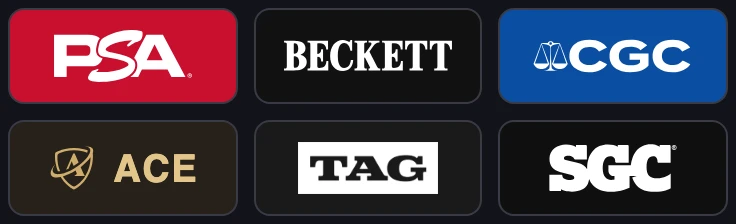
- PSA (Professional Sports Authenticator): the most widespread company, red label.
- Beckett, short BGS (Beckett Grading Services): black and gold label, known for half grades.
- CGC: blue label.
- ACE Grading: UK company, gold on black label.
- TAG: black label.
- SGC: black label.
Each company has its own scale and its own names for the top grades: a PSA 10 and a CGC 10 are not the same thing and are not worth the same. That is why on DarkDex a slab's value is always read per company and per grade.
Your slab collection on DarkDex
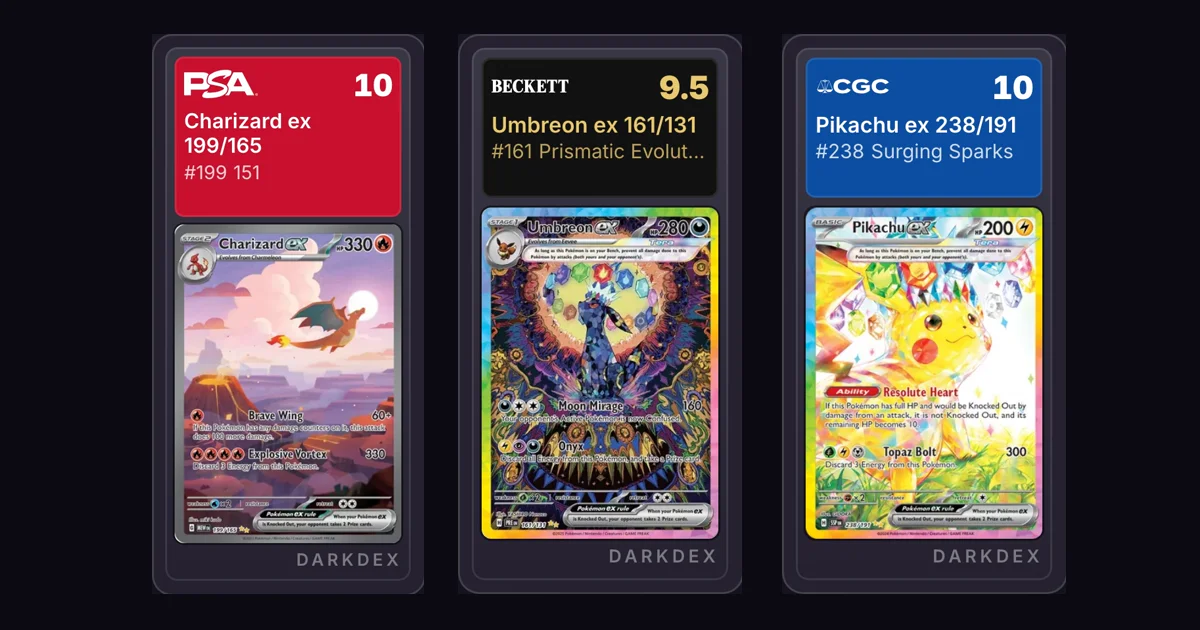
Every graded card is shown inside its slab, with the label in the company's colours, the official logo, the grade and the certificate. Like the ones on the cover: the Charizard ex 199/165 from 151 in PSA 10, the Umbreon ex 161/131 from Prismatic Evolutions in Beckett 9.5 and the Pikachu ex 238/191 from Surging Sparks in CGC 10.
To keep an eye on your graded collection you get:
- the Graded tab, in your collection and on the home page, next to All, Cards and Products: a list and a total of your slabs only;
- the Graded only filter, which shows nothing but slabbed cards;
- the company and grade badge (for example PSA 10) instead of the condition, in list and grid view;
- the home page breakdown, where every slab appears by name next to your sets;
- the collection export, with a Graded sheet listing company, grade and certificate: your inventory ready for insurance, nothing to retype.
If you share a binder, viewers see company and grade of your slabs but never the value or the certificate.
What is a graded card worth
The value of a slab on DarkDex, the DarkDex Price, comes from recent sales of graded copies of that same card, with the same company and the same grade. It is in euros and worked out in the language of your copy.
- It is available for grades 7, 8, 9 and 10. For lower grades and half grades you enter the value yourself.
- Right after you add a slab you may see "Value on its way": the value appears on its own shortly after.
- When there are not enough recent sales for that card, DarkDex asks you to enter the value with one tap.
- If you type your own value, yours always wins, marked as "entered by you", until you change it.
- With Refresh prices, after your regular cards, your slabs are refreshed too.
Every slab's value counts towards your collection total, together with raw cards and products.
Want to know what a card is worth in a slab before buying it or sending it in? On every card page, when available, you will find the DarkDex Price for graded cards box: the 10 of every company and, below, grades 9, 8 and 7. Try it with the Charizard ex 199/165: comparing its raw value with its PSA 10 value is the quickest way to tell whether a submission is worth it.
Graded cards on the Free and Pro plans
- Without an account: on a card's public page you can see whether graded values exist, but blurred. Signing up is free and unlocks them.
- Free: you see the graded values of every card and keep one graded card in your collection (it also counts towards the 150 cards of the Free plan).
- Pro: unlimited graded cards, with everything else in the plan.
Frequently asked questions
What is the easiest way to track a graded card collection? An app that knows the grading companies and gives a value per company and grade. On DarkDex you add each slab in a minute, with company, grade, certificate and language, and its value goes into your collection total.
Can I use a spreadsheet for my graded cards? Yes, but you update the values by hand and you cannot see the cards. If you already have one, keep it as an archive: the DarkDex collection export gives you a Graded sheet that is always up to date.
Which grading companies can I record? PSA, Beckett (BGS), CGC, ACE, TAG and SGC.
Do I have to enter the certificate number? It is optional, but worth it: it keeps every slab on its own row and it is in the export, handy for sales, trades and insurance.
How do I know what my graded card is worth? For grades 7, 8, 9 and 10 DarkDex works out the DarkDex Price per company, grade and language. For other grades, or when recent sales are missing, you enter the value and it stays yours until you change it.
Do a slab and the same raw card add up? No. They are two separate rows with two different values, because they are two different items.
Can people viewing my shared binder see what my slabs are worth? No. They only see company and grade, never the value or the certificate.
How many graded cards can I track for free? One on the Free plan, unlimited with Pro.
Start tracking your slabs
If you own graded cards, sorting them out takes a minute per slab. On DarkDex you see them in their slab, with their value inside your collection total, next to all your other cards and the AI pricing engine that values them in every condition and language.
Create your free account and add your first slab.